
CyberDefenders BetaGamer
An endpoint‑forensics CTF centered on a user who downloads what he believes is a leaked copy of GTA VI onto his work machine, only to infect it with malware. The challenge involves uncovering the attacker’s initial access, persistence mechanisms, evasion techniques, and other forensic artifacts throughout the compromise.
DFIR CAPTURE THE FLAG
Cory Atkinson
12/19/20258 min read


Link to CyberDefenders Lab: https://cyberdefenders.org/blueteam-ctf-challenges/beta-gamer/
Initial Access
Q1 The developer received an email flagged as junk by Mozilla Thunderbird. The email, suspected to be from an attacker, urged the developer to download GTAVI. Can you identify the attacker's email address?
So I got this address by opening the SQLite file under the user's appdata folder here (With DB Browser) D:\Users\neo-gamer\AppData\Roaming\Thunderbird\Profiles\xaqahji7.default-esr. The global-messages-db.sqlite DB will get you the sender's email address. You can export the file via FTK Imager as well.
Answer: gamerhelp@mail2tor[.]com (Remove the brackets around the . at the end)
Q2 After reading the email, the user proceeded to download a malicious binary. Could you specify the URL from which the binary was downloaded?
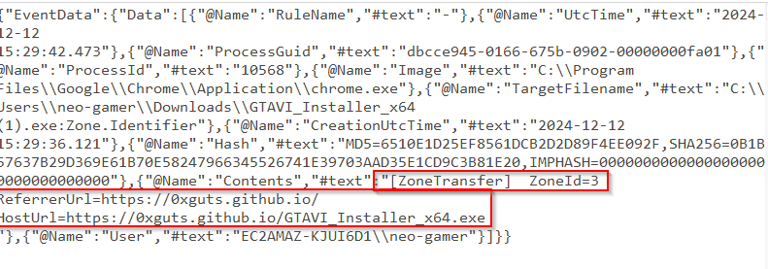
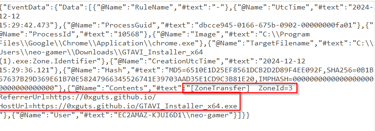
For this we are going to look for the Zone.Identifier which will have the ZoneID (where the file originated from) ReferrerURL (what sent you to the HostURL) and HostURL. HostURL is the source we got the file from. In the Sysmon Logs under FileCreateStreamHash you can find the URL that the malware was downloaded from. Every downloaded file has an alternate data stream with this metadata included.
Scenario
In recent days, we have discovered that some emails from MarsSecure Corp have been leaked, and there have been multiple unauthorized accesses to our systems. Our investigation into the leaked information led us to a developer. We have created a forensic image of the developer's machine to conduct further analysis and identify the root cause of the breach. Now, it’s your task to gather all evidence and determine how the system was compromised and which files, code, or data were exfiltrated from the system.
Tools
Tools needed (All on the provided sandbox under Start Here > Tools)
FTK IMager
Mount the image to use File Explorer, add evidence to peruse in FTK IMager.
DB Browser
C:\Users\Administrator\Desktop\Start Here\Tools\Miscellaneous
EvtxCmd.exe (Fantastic log parser by Eric Zimmerman)
TimeLine Explorer (Another great tool by Eric Zimmerman)
C:\Users\Administrator\Desktop\Start Here\Tools\Log Analysis
Starting Commands
&"C:\Users\Administrator\Desktop\Start Here\Tools\ZimmermanTools\net6\EvtxeCmd\EvtxECmd.exe" -f "C:\Users\Administrator\Desktop\Start Here\Artifacts\KAPE_out\C\Windows\System32\winevt\logs\Microsoft-Windows-Sysmon%4Operational.evtx" --csv C:\Users\Administrator\Desktop\ --csvf sysmon.csv
&"C:\Users\Administrator\Desktop\Start Here\Tools\ZimmermanTools\net6\EvtxeCmd\EvtxECmd.exe" -f "C:\Users\Administrator\Desktop\Start Here\Artifacts\KAPE_out\C\Windows\System32\winevt\logs\Microsoft-Windows-PowerShell%4Operational.evtx" --csv C:\Users\Administrator\Desktop\ --csvf powershell.csv
&"C:\Users\Administrator\Desktop\Start Here\Tools\ZimmermanTools\net6\EvtxeCmd\EvtxECmd.exe" -f "C:\Users\Administrator\Desktop\Start Here\Artifacts\KAPE_out\C\Windows\System32\winevt\logs\security.evtx" --csv C:\Users\Administrator\Desktop\ --csvf security.csv
Next open TimeLine Explorer and load the three CSV into it in order to easily switch back and forth.
TimeLine Explorer Can be found here.
C:\Users\Administrator\Desktop\Start Here\Tools\ZimmermanTools\net6\TimelineExplorer
Command Breakdown
& - Call operator in PowerShell. Basically, execute whatever comes next, script, .exe etc.
"C:\Users\Administrator\Desktop\Start Here\Tools\ZimmermanTools\net6\EvtxeCmd\EvtxECmd.exe" - Full file path for EvtxECmd.exe, which is called by the ampersand above.
-f - This designates a log file, -d would designate a directory of log files (file extension .evtx).
--csv - Specifies that the output should be in CSV format (necessary for Timeline Explorer), and dictates which directory the file should be placed in.
--csvf - Specifies the CSV file name.
Execution
Q3 The attacker created a directory to store additional malicious tools. Could you specify the name and path of the directory created by the attacker?
So we know the malicious binary was downloaded, check the downloads folder for the binary. Are there any other folders under this initially compromised user that stands out? What about
Answer: C:\Users\neo-gamer\AppData\GTAVI_Game_Temp
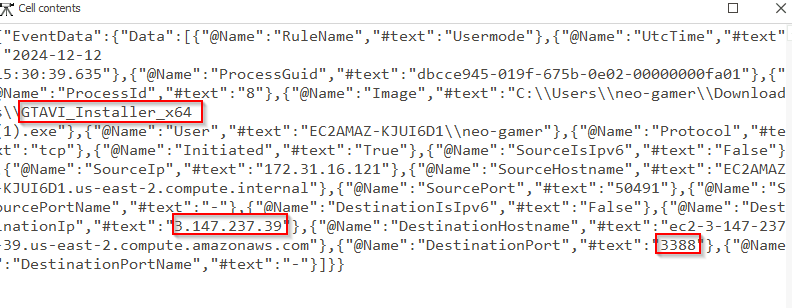
Q4 The binary was executed, and upon execution, it established a connection. Could you provide the IP address and port used for this connection?
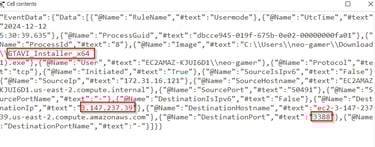
So we know the name of the malware, we have Sysmon which records network connections by programs. Lets look for the malicious process and any connections it made. Remember this will not be under the Process Creation Event, it will be under the Network Connection event.
Answer: 3.147.237.39:3388
Persistence
Q5 One of the dropped malicious tools was used to achieve persistence by creating a scheduled task. Could you identify which tool was responsible for this action?
Looking into this I started with Sysmon and looked through the executable information in order to see if there was anything that stood out among all the red flags. Eventually you should come across a tool called SharPersist.exe with an interesting flag of -t schtask. The full command was
SharPersist.exe -t schtask -c "C:\Windows\System32\cmC:\Users\neo-gamer\AppData\GTAVI_Game_Temp\UpdateCheck.exe" -n "System Update" -m add -o logon
Breaking this down -t is the persistence technique, -c is the command to execute -n is the name of the task or service, -m is the method and -o is optional add ons.
Answer: SharPersist.exe
Q6 The attacker created a new user account. Could you provide the username associated with the newly created account?
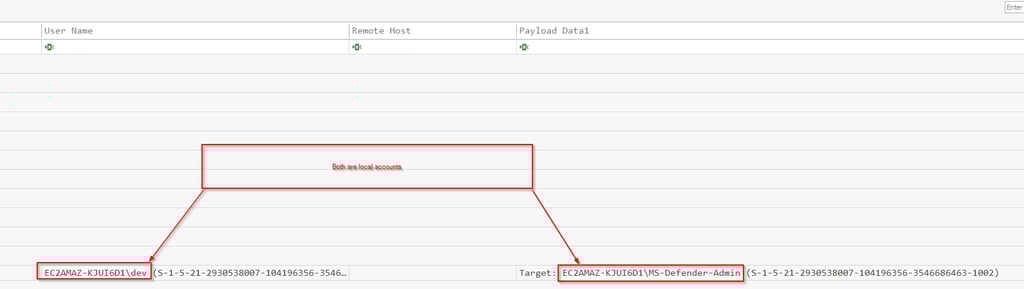
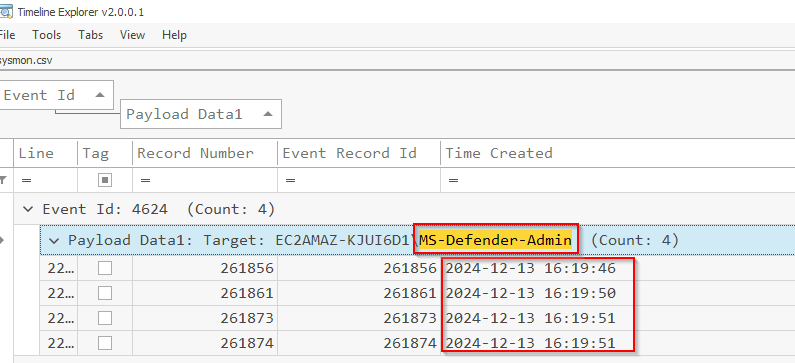
This event will be under the Windows Security Event log, we are looking for event 4720, New account creation. We see there was one account created by the dev account, MS-Defender-Admin. This fits in with the normal attack modus operandi, they prefer to choose account names that could blend in. How many accounts are on the average Windows box and most people are unaware of what is normal. TO find evil you need to know normal.
Also notice that both accounts are local to that machine, as indicated by the computer name proceeding the user account. If they were domain accounts, the domain would precede the username.
Privilege Escalation
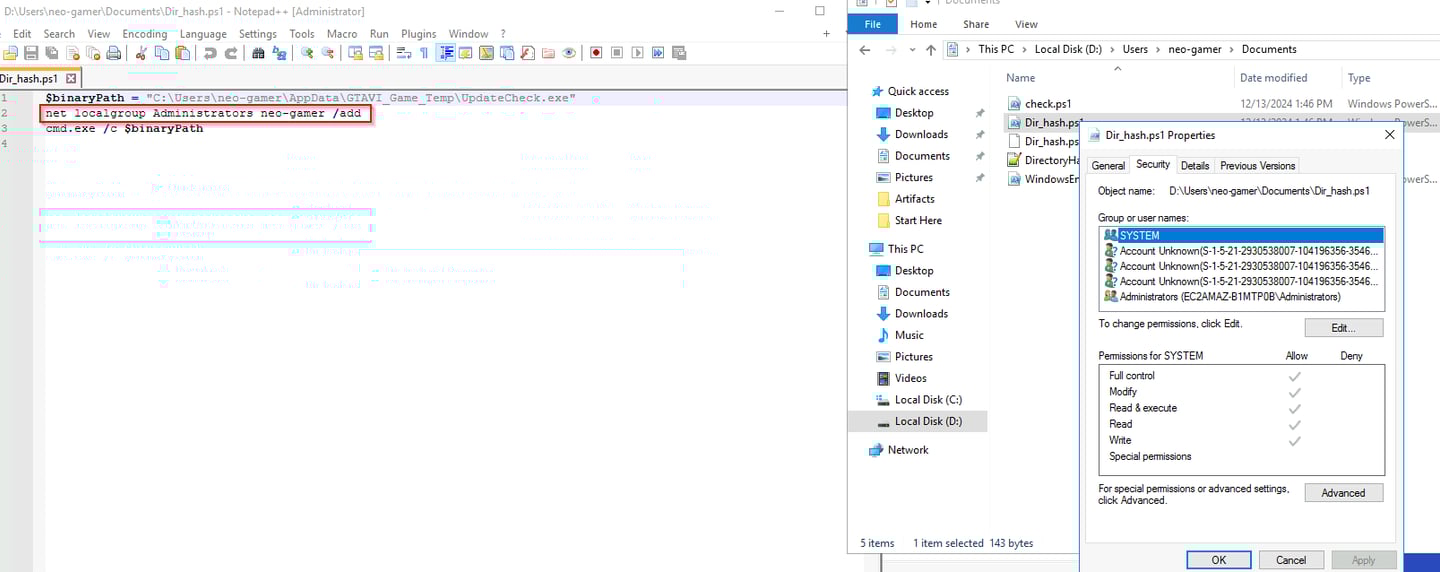
Q7 The attacker altered a script to add the current user to the Administrator group. Could you specify the path of the script that was modified for this action?
Initially I started with the PowerShell operational log, saw Dir_hash.ps1 and decided to check out the original file via the E01 provided. Boom easy, this is the modified script.
Answer: C:\Users\neo-gamer\Documents\Dir_hash.ps1
Q8 After gaining Administrator privileges, the attacker still could not execute commands as the SYSTEM user. The analysis revealed a binary was replaced, leading to unexpected command execution. Could you provide the name of the binary that was modified to escalate privileges further?
This one I guessed on, we need to figure it out better. I narrowed it down via file creation, the file creation was after the MS-Defender-Admin was created and it was a modification to an existing binary in the /dev profile. This led me to believe that it was likely the malicious binary. I then ran the file hash through VirusTotal which flagged it slightly, leading me again to believe it is likely the malicious binary.
Answer: yara64.exe
Credential Access
Q9 Credential dumping activity was detected by Microsoft Defender. The attacker executed a command to dump credentials. Could you provide the specific date and time when this activity occurred?
So for this we will examine the Windows Defender event log. The log is titled Microsoft-Windows-Windows Defender.evtx and is under the same location as the other logs. Parse it with EvtxCMD.exe. Look under detections and you should see a famous tool used for dumping credentials. Use the first not the second time it was detected.
Answer: 2024-12-13 15:06


Defense Evasion
Q10 The attacker modified the registry to disable Defender's Real-Time Monitoring. Could you provide the specific date and time when this action occurred?
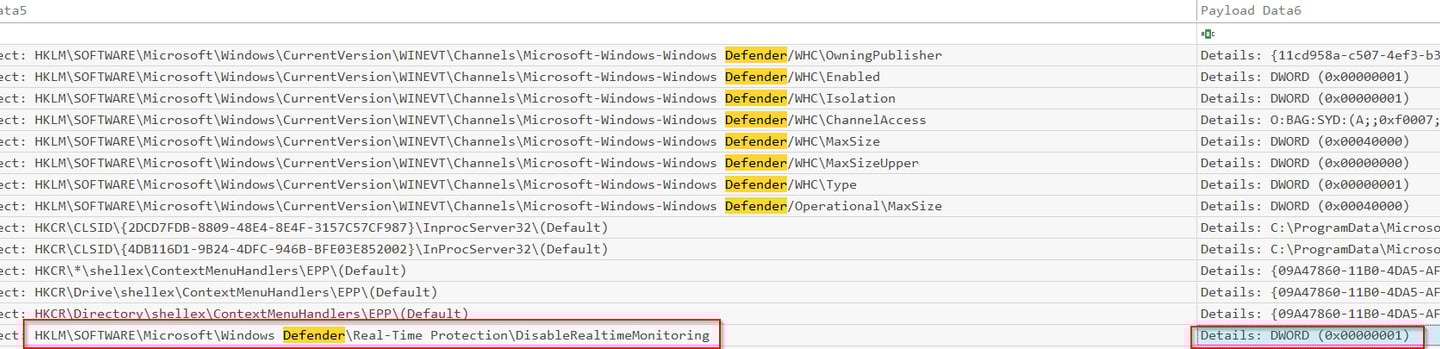
For this question we will use Sysmon and if we know the registry key that controls this function that makes the search a lot easier.
HKLM\SOFTWARE\Microsoft\Windows Defender\Real-Time Protection\DisableRealtimeMonitoring.
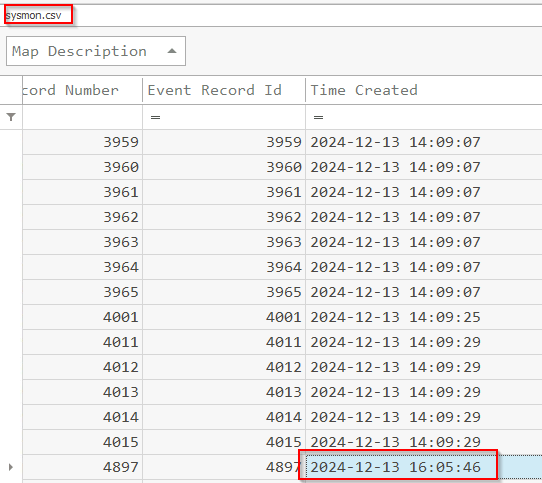
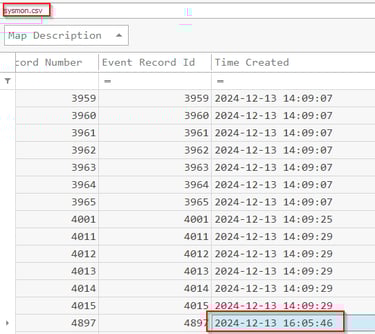
To break this down if this registry is turned from 0 (off) to 1 (on) it is turning off Windows Defender, the security solution on this device. DWORD 0x00000001 is on and all zeros (except for the x in 0x00) would be off. Look at the time this occurred, you have your answer.
Answer: 2024-12-13 16:05
Q11 The attacker logged in using the newly created user account. Could you provide the IP address from which this login occurred?
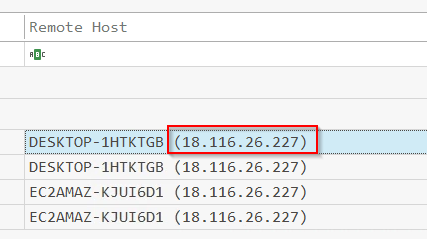
For this we need to pivot back to the security log for successful logons under event 4624. Use the filter option to narrow the column down to the targeted account. You'll be presented with four times, use the first one.
Answer: 18.116.26.227
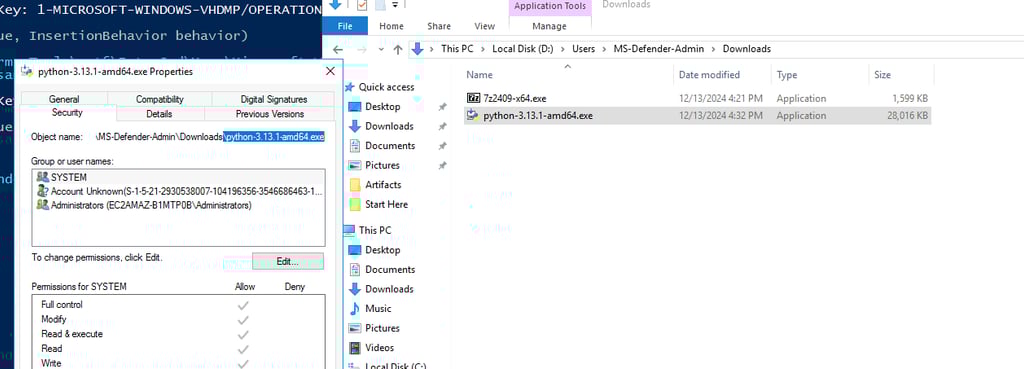
Q12 What files were downloaded onto the system by the newly created user account?
Always check the Downloads folders. Located under the MS-Defender-Admin account's download folder.
Answer: 7z2409-x64.exe,python-3.13.1-amd64.exe
Q13 The attacker utilized one of the tools downloaded by the newly created user to archive specific directories, potentially for exfiltration purposes. Could you provide the names of the directories that were archived?
Using the Sysmon logs this was easy to track down using the Executable Info column. Once you have a malicious account you would do you best to track ALL activity it did.
Answer: Thunderbird, Defender Temp Files


Q14 During the analysis, a final compressed file containing the archived data was identified. Could you provide the name of this archive file?
This is looking for the output of the compressed files, the archive. Its found in the MS-Defender-Admin Documents folder. I located it by following question 13's answer. Remember each piece is in addition to the investigation, if you know a threat actor is depositing tools in a directory, look around. Follow the trail.
Answer: dump.7z
Q15 Several commands were identified that suggest an exfiltration attempt, where the attacker was transferring the archive to a remote server. Could you provide the IP address and port number used for this data exfiltration?
This one was a bit difficult, if an attacker is making an archive, they are either exfiltrating it or preparing it for exfiltration. I tried to follow dump.7z down that trail and initially found nothing. Next I checked where PowerShell history is stored by default at (in this instance it will be D drive most likely).
C:\\Users\\%username%\\AppData\\Roaming\\Microsoft\\Windows\\PowerShell\\PSReadline
Under the MS-Defender-Admin account we found to be created by the attacker, you will find the PowerShell console histroy has exqactly what you need.
Answer: 3.147.237.39:8888

